Every ServiceNow module depends on Foundation Data. Incident Management needs accurate users and groups. Asset Management needs correct locations and cost centers. CMDB relies on departments and companies to map ownership.
When Foundation Data is wrong, everything built on top of it is wrong too. And in most organizations, Foundation Data is at least partially wrong.
The root cause is almost always the same: manual processes. Someone exports a CSV from SAP HR, reformats it, and imports it into ServiceNow. Someone else updates Active Directory groups but forgets to sync the changes. Departments get reorganized, and the ServiceNow tables don’t reflect reality for weeks.
The fix isn’t better spreadsheets. It’s automation.
What Is Foundation Data in ServiceNow?
Foundation Data refers to the core reference tables that every other ServiceNow module builds on. If you follow ServiceNow’s Common Service Data Model (CSDM), you’ll recognize these:
- Users (sys_user) – Employees, contractors, service accounts
- Groups (sys_user_group) – Support teams, approval groups, assignment groups
- Locations (cmn_location) – Offices, data centers, warehouses
- Companies (core_company) – Legal entities, vendors, partners
- Departments (cmn_department) – Organizational units
- Cost Centers (cmn_cost_center) – Financial allocation units
- Business Units (business_unit) – Higher-level organizational groupings
These aren’t glamorous tables. Nobody gets excited about maintaining location records. But when a user submits an incident and their department is wrong, it routes to the wrong team. When a cost center is missing, financial reporting breaks. When a location doesn’t exist, asset tracking falls apart.
Foundation Data is the boring infrastructure that makes everything else work.
Why Manual Sync Fails
We’ve worked with organizations ranging from 500 to 50,000 employees. The pattern is the same regardless of size. Manual Foundation Data management breaks down for predictable reasons.
Multiple source systems. Users live in Active Directory and Entra ID. Organizational structures come from SAP HR or Workday. Locations might be in a facilities management system. Cost centers come from the ERP. No single system has the complete picture.
Update frequency. People join and leave. Departments reorganize. Offices open and close. In a company with 5,000 employees, there are dozens of changes every week. Manual processes can’t keep up without dedicated staff.
Human error. Someone types “IT Operations” in one system and “IT-Operations” in another. A location is entered as “Vienna Office” here and “Wien Büro” there. These inconsistencies cascade through every process that touches the data.
No audit trail. When data is manually imported via CSV, who changed what and when? Good luck answering that question during a compliance audit.
See the most common Azure Automation mistakes to avoid
The Automated Sync Architecture
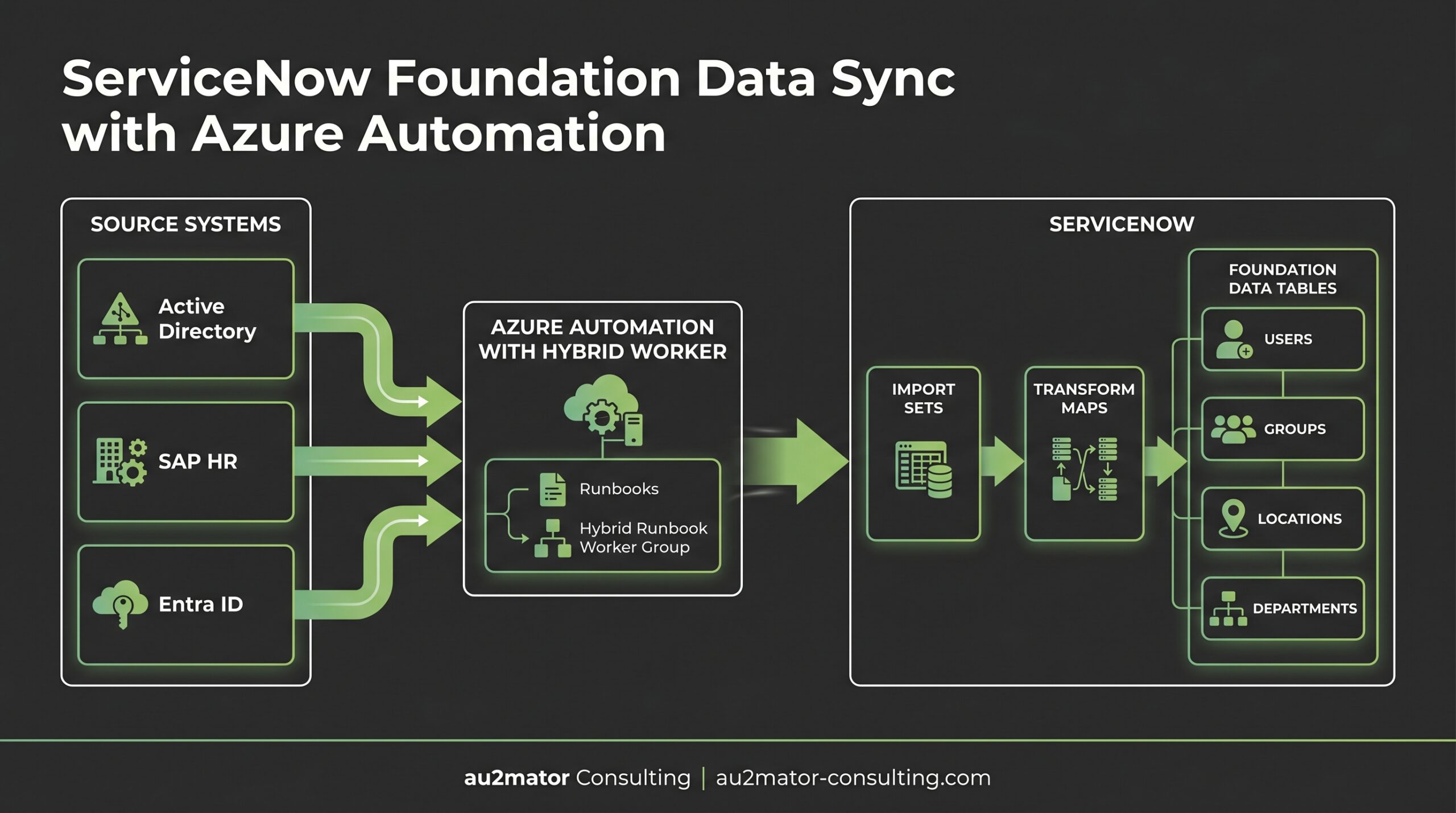
The architecture for automated Foundation Data sync is straightforward. Three layers, each with a clear responsibility.
Source Systems Layer
This is where the authoritative data lives:
- Active Directory / Entra ID for user accounts, group memberships, and some organizational attributes
- SAP HR / SuccessFactors / Workday for organizational structures, departments, cost centers, manager relationships
- Facilities or ERP systems for locations, companies, business units
The key principle: each data attribute has exactly one authoritative source. The user’s email comes from Entra ID. Their department comes from SAP HR. Their office location comes from the facilities system. No conflicts, no ambiguity.
Azure Automation Layer
Azure Automation acts as the integration engine. Runbooks pull data from source systems, transform it to match ServiceNow’s expected format, and push it to ServiceNow via REST API.
For on-premises sources like Active Directory, a Hybrid Runbook Worker runs inside the corporate network. It can reach AD via LDAP and ServiceNow via HTTPS. No VPN tunnels or complex firewall rules needed for the ServiceNow side.
For cloud sources like Entra ID or SuccessFactors, runbooks run on the Azure sandbox or a cloud-connected Hybrid Worker. Authentication uses Managed Identity for Azure resources and stored credentials (via Key Vault) for third-party APIs.
A typical sync runbook follows this pattern:
1. Connect to source system (AD, Entra ID, SAP API)
2. Query for changes since last sync (delta) or all records (full)
3. Transform data to ServiceNow Import Set format
4. POST records to ServiceNow Import Set API
5. Trigger Transform Map to process records
6. Log results and handle errors
ServiceNow Layer
Data enters ServiceNow through Import Sets and Transform Maps. This is critical. Never write directly to production tables like sys_user or cmn_department.
Import Sets are staging tables. Data lands there first. Transform Maps then apply business rules: field mapping, data validation, coalesce (match) logic to update existing records or create new ones, and any necessary transformations.
This two-step approach gives you:
- Validation before data hits production tables
- Error handling with clear logs of what transformed and what didn’t
- Rollback capability since import sets keep the original data
- Audit trail showing exactly what came in and what changed
Real-World Implementation: Manufacturing Company
A manufacturing company with 5,000 employees across 12 locations had a familiar problem. User data lived in Active Directory. Organizational hierarchy came from SAP HR. Location data was maintained manually in ServiceNow by two administrators.
The results were predictable. 15% of users had incorrect department assignments. Several locations existed in duplicate with slightly different names. Cost center mappings were outdated by months. Every CMDB report that relied on these relationships produced questionable results.
We implemented an automated sync with three runbooks:
User Sync (runs every 2 hours):
- Queries Entra ID for all enabled users via Microsoft Graph API
- Pulls department, cost center, and manager from SAP HR via OData API
- Merges data using employee ID as the common key
- Pushes to ServiceNow sys_user Import Set
- Transform Map coalesces on employee_number, updates existing users, creates new ones
Group Sync (runs every 4 hours):
- Queries Active Directory for security groups matching a naming convention
- Maps group membership to ServiceNow sys_user_group and sys_user_grmember
- Handles nested groups by flattening the hierarchy
Location and Org Structure Sync (runs daily):
- Pulls locations, departments, cost centers, and business units from SAP HR
- Pushes to respective ServiceNow Import Sets
- Handles parent-child relationships (department hierarchy, location hierarchy)
The results after three months:
- Data accuracy improved from ~85% to 99.2%
- Manual data entry effort dropped by 90%
- New employees appeared in ServiceNow within 2 hours of AD account creation instead of days
- CMDB relationship mapping finally had a reliable foundation
Delta Sync vs Full Sync
This comes up in every project. Should the runbook sync all records every time, or only changes?
Full sync is simpler to implement. Query everything, push everything, let the Transform Map sort it out. For small datasets (under 5,000 records), full sync every few hours works fine. It’s also the safer option when source systems don’t reliably track changes.
Delta sync is necessary for large datasets. If you have 50,000 users, querying and pushing all of them every 2 hours puts unnecessary load on every system in the chain. Delta sync queries for records modified since the last successful run.
Implementation approach for delta sync:
# Store last sync timestamp in Automation Variable
$lastSync = Get-AutomationVariable -Name "UserSync_LastRun"

# Query Entra ID for users modified since last sync
$filter = "lastModifiedDateTime ge $lastSync"
$modifiedUsers = Get-MgUser -Filter $filter -All

# After successful sync, update the timestamp
Set-AutomationVariable -Name "UserSync_LastRun" -Value (Get-Date -Format "yyyy-MM-ddTHH:mm:ssZ")
Our recommendation: Start with full sync. Get the pipeline working end to end. Then optimize to delta sync once you’ve validated the process. Premature optimization here adds complexity before you’ve proven the approach.
Error Handling and Validation
Sync runbooks need robust error handling. When you’re pushing thousands of records, some will fail. The question is: do you know which ones and why?
Pre-validation in the runbook:
- Check required fields before sending to ServiceNow (email, employee ID, department)
- Validate data formats (date fields, email syntax)
- Flag records that don’t meet criteria but don’t stop the entire sync
Transform Map error handling:
- ServiceNow Transform Maps have built-in error handling per record
- Configure “Stop on error” only if a single bad record should halt the import
- Usually, you want “Log and continue” so one bad record doesn’t block 4,999 good ones
Post-sync validation:
- After the sync, run a validation query: How many records were processed? How many created, updated, skipped, errored?
- Compare counts between source and target
- Alert on anomalies (e.g., if more than 5% of records errored)
Notification pipeline:
- Success: Log to Azure Automation output and optionally to a monitoring dashboard
- Partial failure: Email notification with error details to the integration team
- Complete failure: Immediate alert via Teams or PagerDuty
Scheduling Best Practices
Not all Foundation Data changes at the same rate. Your sync schedules should reflect this.
| Data Type | Recommended Frequency | Rationale |
|---|---|---|
| Users | Every 1–2 hours | New hires, terminations need fast propagation |
| Group Membership | Every 2–4 hours | Assignment groups affect incident routing |
| Departments | Daily | Reorgs happen infrequently |
| Locations | Daily or weekly | Offices don’t move often |
| Cost Centers | Daily | Changes tied to fiscal periods |
| Companies | Weekly | Legal entities change rarely |
Stagger your schedules. Don’t run all syncs at the same time. If the user sync runs at :00 and :30, run group sync at :15 and :45. This avoids hammering ServiceNow’s Import Set API with concurrent loads.
FAQ
What if the same data exists in multiple source systems?
Define a single authoritative source per attribute. The user’s name and email come from Entra ID. Their department and cost center come from SAP HR. Document these mappings and enforce them in your runbooks. Never merge conflicting values without a clear precedence rule.
How do you handle deleted users or deactivated accounts?
Don’t delete records from ServiceNow. Set them to inactive. Your sync runbook should compare source records against ServiceNow, and any ServiceNow record without a matching source record gets flagged as inactive. This preserves historical data and audit trails.
What about ServiceNow’s built-in LDAP integration?
ServiceNow has native LDAP and Azure AD integrations. They work for basic user sync. But they don’t handle complex scenarios: merging data from multiple sources, custom business logic during import, or syncing non-user Foundation Data like cost centers and business units. Azure Automation gives you full control over the integration logic.
How long does a typical Foundation Data automation project take?
For a single source system (e.g., Entra ID to ServiceNow Users and Groups), expect 2–4 weeks including development, testing, and documentation. For multi-source scenarios with complex business rules, 6–10 weeks is realistic. The Transform Map configuration in ServiceNow often takes longer than the runbook development.
Can this approach handle SAP HR data specifically?
Yes. SAP exposes organizational data via OData APIs (SuccessFactors) or RFC/BAPI calls (on-premise SAP). Azure Automation runbooks can call these APIs directly. For on-premise SAP, use a Hybrid Runbook Worker within the network that can reach the SAP system. We’ve implemented this at multiple customers with SAP as the HR master system.
Struggling with Foundation Data quality in ServiceNow? We design and implement automated sync solutions that connect your source systems to ServiceNow. Clean data, reliable processes, zero manual effort.